

Spotify introduces Android-exclusive feature!
While most of your apps do try to aim for feature parity and convenience between iOS and Android, there’s just moments where they’re able to leverage one OS over the other better. And most of the time, this is on the iOS side. However, Spotify may have just gotten a feature that works best on Android and isn’t available for iOS. For now at least.
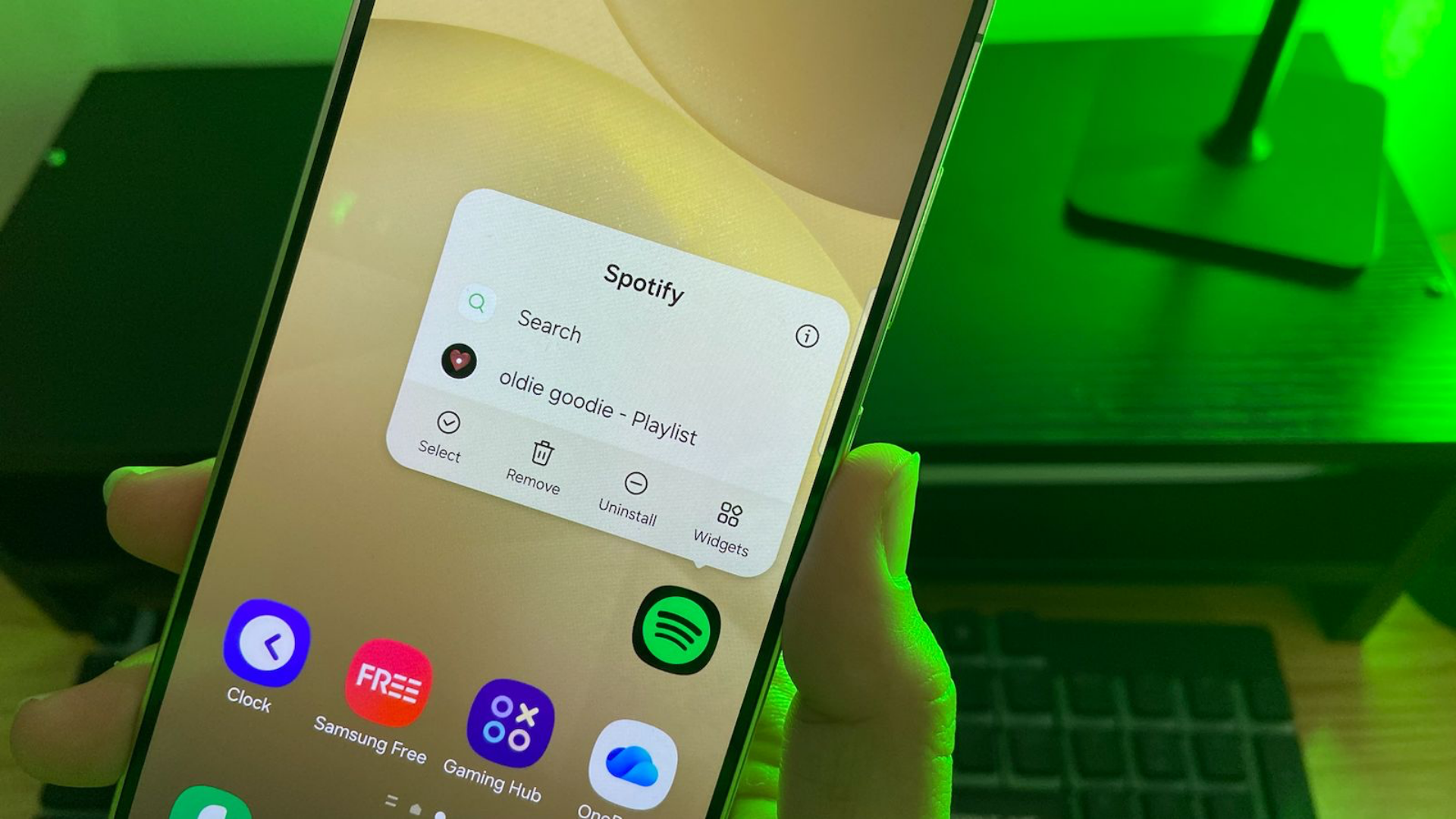
This has everything to do with App Shortcuts where you can long press an app and directly go to a certain part of an app, rather than going through the whole thing. In Spotify’s case, you can directly go to an artist and playlist and just play it. No need to go through the entire app to play your favorite tunes on your speakers! And yes, you can even save unlimited shortcuts if you want.
5 Easy Steps For Your Playlist!
It’s not a super complicated process either. You can basically get there in five easy steps, provided you’re using an Android phone running Android 7.1 or above. So basically any phone you would’ve gotten since 2016.
• First, go to an artist or playlist you want to create a shortcut for inside your Spotify app. Bear with us a bit.
• Then, play a song (any song will do; just play the first one if you’re in a hurry) from inside the artist or playlist’s page. This is probably the most crucial step.
• Go out of the Spotify app and into your home screen or app drawer. Go to the Spotify app icon.
• Tap and hold this icon and you should see a new open under Search with the specific music/album you’re playing. This should be your App shortcut.
• Simply drag this shortcut to your home screen. Repeat as often as you want for all the playlists you want.
Definitely convenient though you’ll probably start filling up a bulk of your home screen or app drawer with a bunch of Spotify icons in no time though. Just think of it as a built-in folder view for your favorite music.
Right now though, it only works for individual artists and playlists you already have. It doesn’t seem to support albums just yet though there’s conflicting reports on this too.
Android App Shortcuts

Android App Shortcuts have been around since 2016 so it’s not completely new. It’s a good feature for people in a hurry since it allows them to immediately head to a part of the app experience, bypassing everything else. (e.g. immediately compose an email rather than starting at the inbox)
Shortcuts can either be static or dynamic depending on the app. A dynamic app shortcut may show you like, your most recent contacts if used in messenger apps while a static one should stay the same regardless of any updates.
If you ask us, it’s kind of funny that a well-received feature of Spotify seems to be geared towards preventing it from getting in the way of what actually matters to us: the music. After all, sometimes, you just want to curl up with some comfortable headphones and just tune out all of the distractions away!
For gadgets and electronics, get it at Kimstore!


